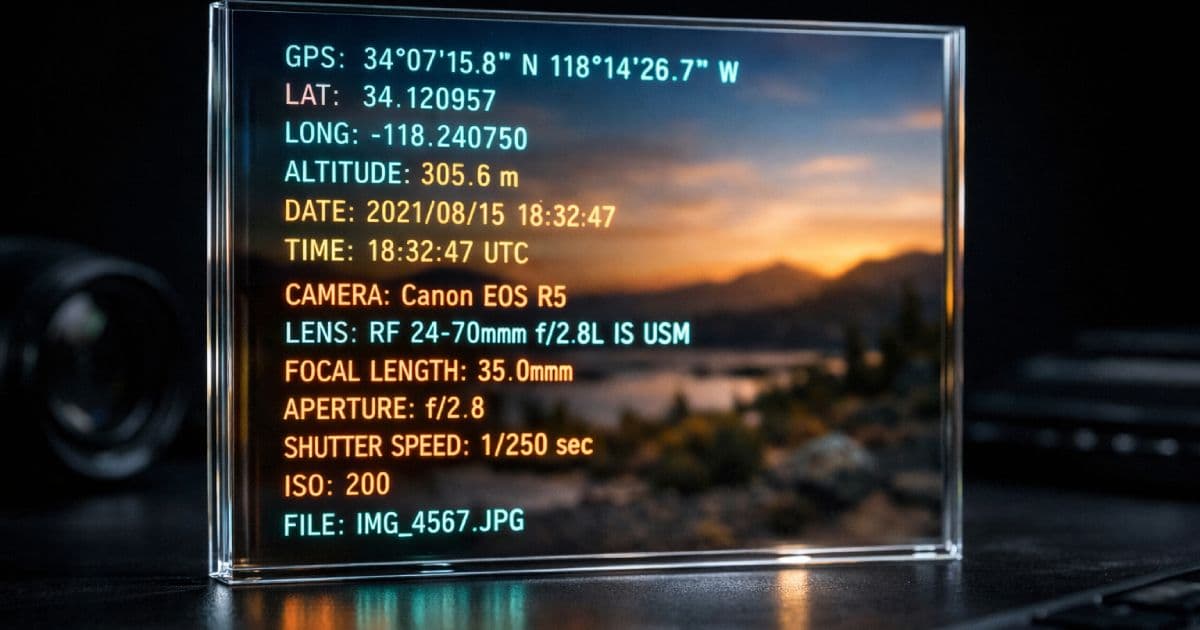

A photo looks harmless when viewed on a screen. The pixels show what was in front of the lens — a product, a landscape, a workspace, a person. What the pixels do not show is the hidden data payload that travels with the file: the exact GPS coordinates where the shutter fired, the precise date and time of capture, the make and model of the device, the software used to edit it, and sometimes the name of the photographer embedded in a copyright field.
This metadata is invisible to casual viewing, but it is trivial to extract. A journalist, an investigator, a marketplace competitor, or a motivated attacker with the original file can recover location, timeline, and device information in seconds. For privacy-conscious users, development teams handling user uploads, and anyone sharing sensitive imagery, unstripped metadata is a silent exposure.
TL;DR
- Photos can contain hidden EXIF, IPTC, and XMP metadata.
- This metadata may reveal GPS coordinates, capture time, device details, and editing history.
- The safest way to share sensitive images is to inspect metadata first and export a clean copy before publishing.
Curious what your photos are broadcasting? Use the CodeAva EXIF Metadata Viewer & Stripper to inspect and sanitize images locally in your browser — no uploads, no server, no data leaving your device.
Why this matters in the real world
Metadata exposure is not theoretical. A home-office photo posted to a forum can reveal the exact latitude and longitude of a residence. A marketplace listing photo can disclose where a seller lives or stores inventory. An internal product photo shared before launch can leak creation timestamps, editing software, and device fingerprints that help competitors reconstruct workflows.
For teams building applications that accept user uploads, the risk is systemic. If your platform accepts image files and serves them back to users without sanitization, you may be unintentionally distributing customer location data, device information, and creation timestamps. This is a privacy issue, a potential compliance concern under data protection frameworks, and a security issue if the metadata helps an attacker profile users.
GPS coordinates, timestamps, and device-linked information can become privacy-sensitive information in many contexts. Teams handling user uploads should treat metadata stripping as part of secure media handling, not a user-side convenience. The engineering decision to sanitize on upload is far safer than hoping users will sanitize before sending.
What hidden metadata can reveal
Not every image contains every category of metadata. The risk depends on how the image was captured, what device created it, and what software processed it afterward. Here is what can be embedded:
| Metadata category | What it can contain | Privacy risk level |
|---|---|---|
| GPS location | Latitude, longitude, altitude, speed, direction; sometimes includes GPS timestamp separate from capture time | High — reveals exact or near-exact physical location |
| Capture date and time | Exact timestamp when shutter fired; timezone offset where available | Medium — enables timeline reconstruction, correlation with other events |
| Camera and device | Make, model, serial number (rare), firmware version; lens make and model | Medium — device fingerprinting, targeted exploitation, social engineering |
| Exposure and lens | Aperture, shutter speed, ISO, focal length, flash state, metering mode | Low — mostly technical, rarely privacy-sensitive alone |
| Author and copyright | Creator name, artist field, copyright string, credit line | Medium — attribution tracking, identity linkage |
| Editing software | Software name and version, edit history in some XMP workflows | Medium — workflow reconstruction, version targeting |
The risk compounds. A single image with GPS coordinates reveals location. A second image with GPS and a different timestamp reveals movement. A third with device model and software version reveals the tools used. Combined, these metadata fields enable profiling that purely visual inspection of the pixels cannot prevent.
EXIF vs IPTC vs XMP: what developers should know
Three distinct metadata standards often coexist in a single image file. Understanding the difference matters because "remove EXIF" is often too narrow if the goal is genuine sanitization.
- EXIF — originated from camera manufacturers. It stores technical capture data: camera model, lens, exposure, orientation, GPS coordinates, timestamps. It is the most common standard for consumer device metadata.
- IPTC — developed for news agencies and publishing. It stores editorial metadata: captions, keywords, credit lines, copyright notices, bylines. Professional photography workflows frequently embed rich IPTC blocks.
- XMP — Adobe's extensible standard. It can carry almost anything: editing history, color profiles, workflow metadata, and application-specific data added by Lightroom, Photoshop, and similar tools. XMP is often the largest metadata block in a processed professional image.
A privacy-safe sanitization workflow must address all three families, not just EXIF. Tools that advertise "EXIF removal" but ignore IPTC and XMP may leave significant metadata intact. The safest approach is complete re-encode or byte-level removal of all embedded metadata blocks.
The fake deletion problem
Some workflows remove only part of the metadata story. A user might run a tool that claims to "strip EXIF" and believe the image is clean. But if the tool only clears the GPS fields while leaving IPTC captions and XMP editing history, the sanitization is incomplete. The user has a false sense of security.
Partial stripping is risky
This is particularly dangerous in OSINT (open-source intelligence) contexts. An investigator looking at a "sanitized" image may not find GPS coordinates, but the combination of camera model, timestamp, and editing software can still narrow down the photographer's identity, workflow, and sometimes location history. Partial stripping is not privacy. It is just less obvious exposure.
How the CodeAva stripping model works
The CodeAva EXIF Metadata Viewer & Stripper is designed for transparency. It inspects images locally in the browser using the ExifReader library. No file is uploaded. No server processes your data. The metadata inspection happens entirely within your browser tab.
The tool surfaces metadata categories grouped by type: Camera & device, Date & time, Exposure & lens, GPS / location, Author & copyright, and Technical. A privacy risk summary highlights the most sensitive fields automatically. You can expand each group to inspect individual values, or view a raw tag dump for advanced analysis.
For sanitization, the tool uses the browser Canvas API. This is a deliberate engineering choice: Canvas re-encodes the image pixel data into a new file, and no embedded metadata survives the process. The output is a genuinely clean copy, not a partially edited original. The trade-off is that selective field preservation (keep copyright but remove GPS, for example) is not possible with this approach. If you need surgical field editing, a dedicated server-side tool is more appropriate.
Architecture transparency
GPS danger and the opt-in map pattern
GPS metadata is uniquely dangerous because it transforms a photo into a location beacon. The coordinates embedded in a smartphone photo are often accurate to within meters. A photo taken in a living room can reveal the exact residence. A photo taken from a hotel window can reveal the floor and room orientation.
Showing GPS coordinates on a map creates a strong "aha" moment for users — they suddenly understand what their photo has been carrying. But loading a map preview automatically creates a new privacy problem: the map tile request contacts a third-party service and may log the IP address, user agent, and requested coordinates.
Why auto-loading maps is a privacy leak
The ethical approach is strict opt-in. The CodeAva tool shows the raw latitude and longitude immediately. The map preview requires two explicit clicks: first to reveal a consent dialog explaining that external tiles will load, second to actually fetch the map. No external request happens without affirmative user consent.
How to remove metadata safely before sharing
Privacy-safe image checklist
- 1Inspect locally — use a browser-based tool to check metadata before any upload or publication.
- 2Check GPS first — location data is the highest-risk field. Verify latitude and longitude are absent or acceptable to share.
- 3Review timestamps and device — capture time and camera model can enable profiling and correlation attacks.
- 4Export a clean copy — use re-encode or dedicated stripping. Never assume the original is safe.
- 5Re-check the cleaned file — upload the output back into the inspector to confirm zero metadata detected.
- 6Optimize if needed — after privacy sanitization, compress and convert for web delivery if necessary.
Follow this sequence every time you share an image that contains sensitive context: personal spaces, unreleased products, client work, journalism sources, or any photo taken in a private location.
Zero-trust EXIF sanitization in the browser
You should not upload a privacy-sensitive image to an unknown remote service just to remove the metadata that makes it privacy-sensitive. That workflow defeats its own purpose: the moment you upload, the metadata you were trying to protect has already left your device and reached someone else's infrastructure.
The CodeAva EXIF Metadata Viewer & Stripper inspects and strips metadata entirely within your browser. ExifReader parses the file locally. The Canvas API re-encodes locally. Your images are never uploaded to a server, never transmitted to a third-party compression service, and never stored between sessions.
The tool highlights privacy risks before you export: GPS coordinates trigger a red warning with explicit coordinate display. A privacy risk summary enumerates what was found. You review, then you strip. The cleaned file is a newly exported copy — verified, not assumed safe.
Privacy first, performance second
Once a photo is privacy-safe, it may still be too large for web delivery. A 12-megapixel smartphone photo can weigh several megabytes even after metadata stripping. That is where optimization comes next.
After sanitizing metadata, use the CodeAva Image Optimizer to compress, resize, and convert to WebP or AVIF. The workflow is sequential: first privacy, then performance. Both matter, and neither should be skipped.
Privacy and performance are separate concerns. A compressed image with intact metadata is still a privacy risk. A metadata-stripped image that is 5 MB is still a performance problem. Handle them in order: sanitize, then optimize.
Stripping metadata in an automated pipeline
For teams processing images at scale, the Node.js sharp library strips metadata by default during any transformation:
import sharp from 'sharp';

// By default, sharp strips all metadata. No EXIF, IPTC, or XMP survives.
await sharp('input.jpg')
  .resize(1200)
  .webp({ quality: 82 })
  .toFile('output-clean.webp');

// To explicitly preserve metadata (not recommended for public assets):
await sharp('input.jpg')
  .withMetadata()   // Keeps EXIF, IPTC, XMP intact
  .toFile('output-with-meta.jpg');
For manual inspection and one-off sanitization — particularly for files that cannot be uploaded to any server — the CodeAva browser tool provides the same zero-metadata output with no infrastructure requirement.
Conclusion and next steps
Hidden image metadata is a privacy issue, not a technical curiosity. GPS coordinates, timestamps, device fingerprints, and editing histories travel silently with image files. Before sharing any photo publicly — whether to social media, a marketplace, a support forum, or a publication — inspect it and export a clean copy.
Partial stripping is risky. Complete sanitization via re-encode or dedicated metadata removal is the only reliable approach when you cannot audit every field individually. Browser-based tools that process locally are the safest choice for files that must not leave your device.
Start with privacy, then optimize for delivery. Both steps matter. Skip either, and you are sharing more than you intended.
Inspect and sanitize your image now, then optimize the clean copy for web delivery. Both tools run entirely in your browser — no uploads, no servers, no metadata leaks.