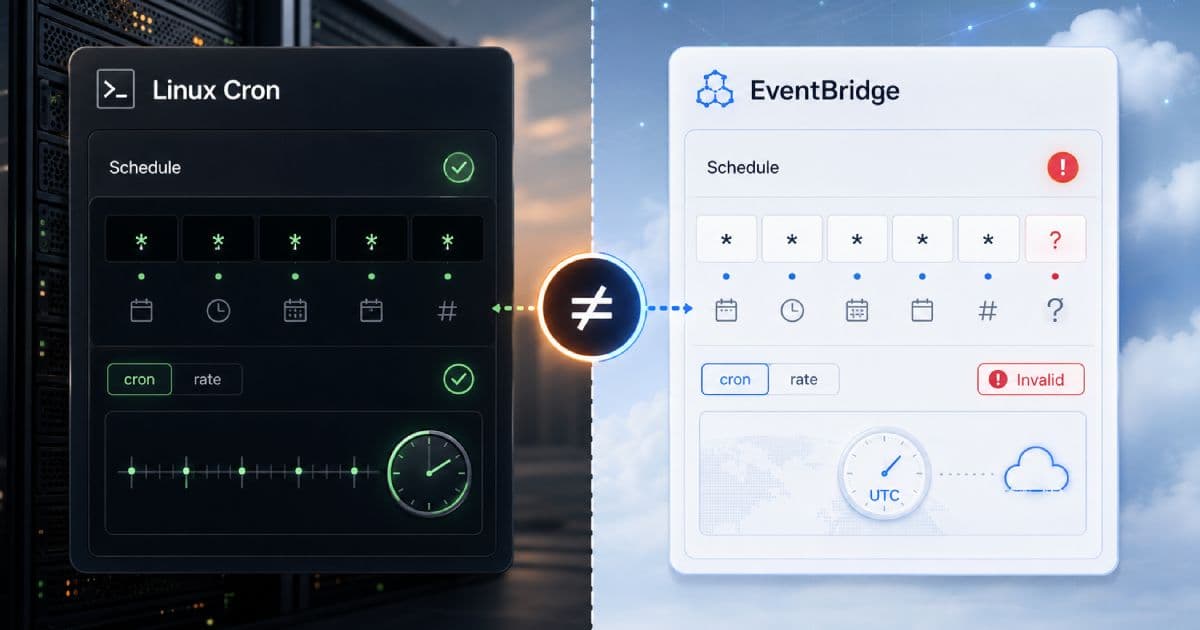

The migration looks harmless. A cleanup job has been running from a Linux server or an EC2 crontab for years, so a developer moves it behind Lambda and EventBridge, copies 0 2 * * * into the AWS console, CLI, CloudFormation, CDK, or Terraform, and gets a schedule-expression validation error instead of a deployed rule.
The schedule is not impossible. The problem is that AWS cron syntax is not Linux crontab syntax. EventBridge and EventBridge Scheduler use an AWS-specific cron dialect with a different field model, different day-field rules, and different time-zone behavior depending on which scheduling surface you choose.
TL;DR
- Linux cron usually uses 5 fields: minute, hour, day of month, month, and day of week.
- AWS cron expressions commonly use 6 fields inside
cron(...), with year as the final field. - AWS requires one of day-of-month or day-of-week to use
?when the other field uses*or a specific value. - Legacy EventBridge scheduled rules are UTC-oriented; EventBridge Scheduler is the better fit for newer time-zone-aware schedules.
- Validate AWS cron expressions before they reach the AWS API or your IaC pipeline.
Build the AWS expression before AWS rejects it.
Do not debug schedule syntax by waiting for a Lambda function to fire. Use the CodeAva AWS EventBridge Schedule Builder to build rate() and cron() expressions, preview the next runs, and keep the AWS field model visible while you migrate.
Linux cron and AWS cron are not the same language
Classic Linux crontab syntax is usually five positional fields:
minute hour day-of-month month day-of-week
0      2    *            *     *
AWS cron syntax inside cron(...) commonly uses six fields:
minute hour day-of-month month day-of-week year
0      2    *            *     ?           *
That extra year field is only part of the migration. AWS also applies special wildcard rules in the day-of-month and day-of-week fields. The syntax looks familiar enough to invite copy-paste, but it is a separate dialect.
EventBridge scheduled rules vs EventBridge Scheduler
AWS now distinguishes between the older EventBridge scheduled rules feature and the newer EventBridge Scheduler service. AWS documents scheduled rules as a legacy EventBridge feature and recommends EventBridge Scheduler for schedule-driven invocations where its expanded scheduling model fits the workload.
Where scheduled rules still show up
Scheduled rules still exist, and many teams have them in Terraform modules, CDK stacks, Serverless Framework configs, and older CloudWatch Events-era templates. You do not need to migrate every existing rule immediately just because it is old. But for new schedules, especially schedules that care about local business time, EventBridge Scheduler is usually the better scheduling surface.
Where EventBridge Scheduler fits better
EventBridge Scheduler supports recurring cron schedules, recurring rate schedules, and one-time schedules. It also supports flexible time windows and explicit schedule time zones, which makes it a cleaner default when the schedule is part of an application or operations workflow rather than a small legacy rule.
| AWS surface | What it is | Migration note |
|---|---|---|
| EventBridge scheduled rule | Older EventBridge rule pattern for invoking a target on a schedule. | Common in existing IaC. Treat schedule times as UTC and validate the AWS cron expression. |
| EventBridge Scheduler | Dedicated AWS scheduling service for recurring cron, recurring rate, and one-time schedules. | Prefer for new schedules that need IANA time zones, flexible time windows, or clearer schedule ownership. |
Difference 1: AWS expects the year field
A Linux expression such as 0 2 * * * has five fields. It means “run every day at 02:00” in the timezone of that cron runtime. AWS cron expressions use a sixth year field in the common cron(...) syntax. For an indefinitely recurring schedule, that final year field is usually *.
The conversion is not just “add *at the end.” The day fields need AWS-compatible wildcard handling too:
# Linux crontab
0 2 * * *

# AWS cron expression
cron(0 2 * * ? *)
The final * is the year field. The ? in day-of-week is what keeps the AWS day-field rule valid.
Difference 2: the ? wildcard solves day-field ambiguity
AWS does not allow * in both day-of-month and day-of-week. It also does not let you constrain both fields with specific values in the same expression. If one day field is active with * or a specific value, the other should use ?.
In AWS cron, ?means “no specific value” in that field. It is the escape hatch that tells AWS which day dimension is not being used for matching.
# Every day at 02:00 UTC
cron(0 2 * * ? *)

# Every Monday at 09:00 UTC
cron(0 9 ? * MON *)

# First day of every month at 08:00 UTC
cron(0 8 1 * ? *)
Do not copy the Linux day fields blindly
Difference 3: AWS has advanced wildcards Linux cron users may not expect
AWS cron supports calendar targeting features that are not portable standard Linux cron syntax. The L wildcard can target the last day of a month or the last occurrence of a weekday, W can target the nearest weekday to a date in the day-of-month field, and # can target the nth weekday of a month in the day-of-week field.
These are useful, but they make the expression AWS-specific. Once you rely on them, the expression should not be treated as a portable Linux crontab line.
# Last day of every month at 23:00 UTC
cron(0 23 L * ? *)

# Last Friday of every month at 10:15 UTC
cron(15 10 ? * 6L *)

# Third Thursday of every month at 09:00 UTC
cron(0 9 ? * THU#3 *)
If your team uses these wildcards, document the AWS dependency directly in the IaC module or runbook. The next engineer should not have to infer why the expression fails in a standard Linux cron parser.
Difference 4: UTC, local time, and EventBridge Scheduler time zones
Legacy EventBridge scheduled rule examples are UTC-based. If a team says “run this every weekday at 9:00,” a scheduled rule interprets that as 09:00 UTC, not 09:00 in New York, London, Johannesburg, Sydney, or the user's browser timezone.
EventBridge Scheduler changes the operational model. Scheduler can evaluate cron-based and one-time schedules in UTC or in an explicit IANA timezone, such as America/New_York, Europe/London, or Africa/Johannesburg. AWS documents this through EventBridge Scheduler's schedule-expression timezone support. For business-local schedules, that is often cleaner than encoding today's UTC offset into a cron expression and hoping nobody forgets DST.
DST still needs deliberate handling. For EventBridge Scheduler cron schedules in a DST-observing timezone, AWS skips a spring-forward local time that does not exist and runs a fall-back repeated local time once, not twice. Rate-based schedules use duration semantics differently from local-time cron schedules around DST.
For a broader timezone playbook, read Cron Timezones Explained. The same underlying mistake shows up here: developers schedule in one clock while the runtime evaluates in another.
Difference 5: precision and expectations
EventBridge Scheduler invokes targets with 60-second precision. If you schedule something for 1:00, expect invocation during that minute, not guaranteed execution at exactly 1:00:00.000. AWS cron expressions also do not support second-level scheduling.
Workloads that require sub-minute precision, hard real-time behavior, or second-by-second orchestration usually belong in a different architecture than EventBridge cron.
Linux-to-AWS conversion examples
Start with intent, then convert the syntax. That keeps you from preserving a Linux string that was already ambiguous or timezone-dependent.
| Linux intent | Linux cron | AWS cron | Note |
|---|---|---|---|
| Every day at 02:00 | 0 2 * * * | cron(0 2 * * ? *) | Add year and set day-of-week to ?. |
| Every weekday at 09:00 | 0 9 * * 1-5 | cron(0 9 ? * MON-FRI *) | Use names to avoid day-numbering confusion. |
| First day of the month at 08:00 | 0 8 1 * * | cron(0 8 1 * ? *) | Day-of-week is not part of the match. |
| Every 15 minutes | */15 * * * * | cron(0/15 * * * ? *) | Consider rate(15 minutes) when calendar time does not matter. |
| Last Friday of the month | Not portable standard syntax | cron(15 10 ? * 6L *) | AWS-specific L usage in day-of-week. |
Common validation errors and what they really mean
AWS validation errors are often syntax-dialect errors, not bad scheduling ideas. When a console, API, or Terraform apply says the schedule expression is not valid, check these causes before redesigning the job.
- Missing year field: You pasted a five-field Linux expression into an AWS
cron(...)context. - Using
*in both day fields: AWS requires?in one of day-of-month or day-of-week when the other is*or a specific value. - Using AWS-only wildcards in Linux cron: Expressions with
L,W, or#are not portable standard Linux cron. - Using Linux-only assumptions in AWS: Day-of-week numbering, field count, and wrapper requirements differ.
- Expecting local time: Legacy scheduled rules are UTC-oriented, while EventBridge Scheduler can use a configured IANA timezone.
- Forgetting the wrapper: AWS APIs and IaC fields commonly expect the full
cron(...)orrate(...)schedule expression.
The migration checklist
Use this checklist before moving a Linux cron job into EventBridge, EventBridge Scheduler, CDK, CloudFormation, Terraform, or a deployment script:
- Identify the original Linux cron intent in plain English.
- Determine whether the job should run in UTC or a business-local time zone.
- Choose EventBridge Scheduler for new time-zone-aware schedules where appropriate.
- Convert the expression to AWS field order.
- Add the year field, usually
*for recurring schedules. - Replace one of day-of-month or day-of-week with
?. - Validate advanced wildcard usage such as
L,W, and#. - Preview the next expected run times in the correct timezone context.
- Test in a lower environment.
- Monitor the first production invocations.
Comparison table
| Feature | Linux cron | AWS EventBridge cron | Migration risk |
|---|---|---|---|
| Number of fields | Usually 5 | 6 inside cron(...) | High: copied strings fail. |
| Year field | Not present | Required in common AWS syntax | High: easy to omit. |
| Day-of-month/day-of-week behavior | Implementation-dependent, often permissive | One field must be ? when the other is used | High: most common AWS mistake. |
? wildcard | Not standard Linux cron | Means no specific value in a day field | Medium: unfamiliar but essential. |
Advanced L, W, # wildcards | Not portable standard syntax | Supported in AWS day fields | Medium: locks expression to AWS. |
| Time zones | Runtime or implementation context | Scheduled rules use UTC; Scheduler can use IANA time zones | High around DST and business time. |
| Minimum precision | Usually minute-level | 60-second precision | Low unless sub-minute timing is required. |
Tool integration: validate before the AWS API rejects it
The CodeAva AWS EventBridge Schedule Builder is the right first stop for this migration because it exposes the AWS six-field cron model, supports rate() and cron() builder modes, shows the generated schedule expression, previews the next five runs, and lets you choose the timezone context used for EventBridge Scheduler-style previews.
If you are comparing AWS cron with a Linux or Quartz expression, the CodeAva Cron Parser & Builder supports profile switching so you can inspect the same schedule idea under the cron dialect you actually intend to deploy.
The most dangerous copy-paste
Conclusion and next steps
Treat AWS cron as a separate dialect, not as a copy-paste target for Linux crontab. The biggest migration mistakes are missing the year field, using the wrong day-field wildcard, and assuming the AWS schedule is running in the same timezone as the original server.
For new schedules that need time-zone support, flexible delivery behavior, or clearer schedule ownership, EventBridge Scheduler is usually a better fit than legacy scheduled rules. For existing scheduled rules, be explicit about UTC and validate every expression before it reaches the console, CLI, CloudFormation, CDK, or Terraform.
Build and preview the expression in the AWS EventBridge Schedule Builder before shipping it. If the confusing part is timezone behavior, pair that with the cron timezone guide so the schedule is correct in both syntax and operational intent.