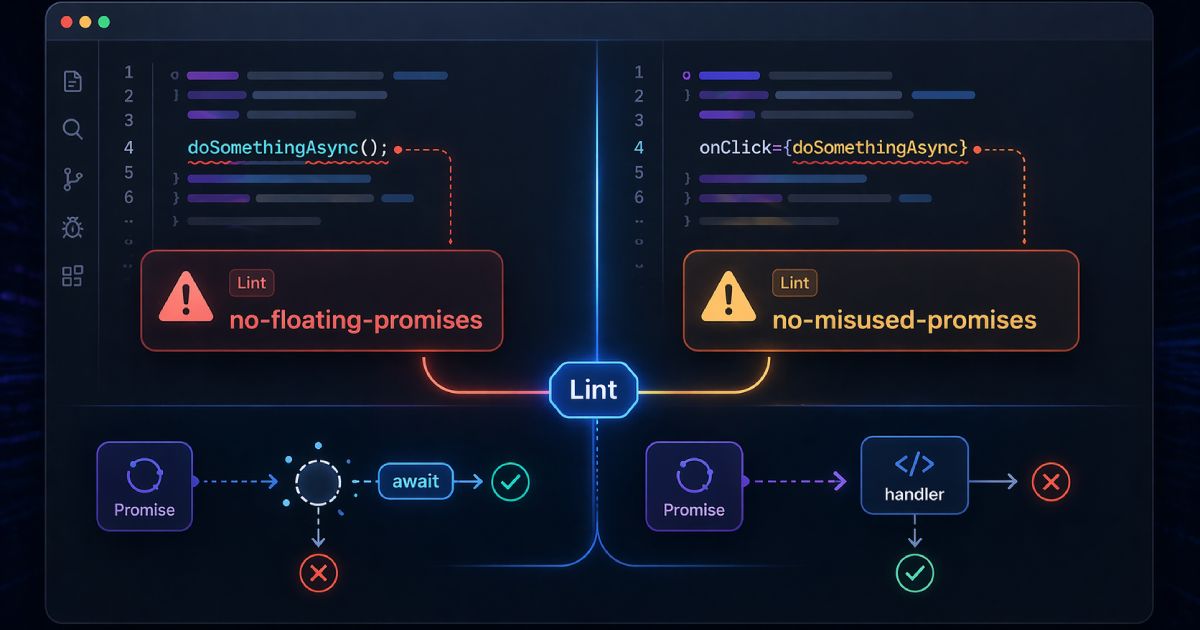

Running tsc --noEmit gives you a clean bill of type health. It is a necessary check \u2014 but it is far from sufficient. TypeScript\u2019s compiler operates within a single concern: are values used in ways that are consistent with their declared types? That is a powerful constraint, but it leaves a wide surface of problems unchecked.
A mature static analysis pipeline layers several tools on top of tsc, each with a distinct mandate. Together they catch the class of issues that cause the most expensive bugs in production TypeScript: unawaited promises, dead exports, functions too complex to reason about safely, and security anti-patterns that the type system is not designed to prevent.
What tsc catches \u2014 and what it does not
TypeScript\u2019s compiler, with a strict configuration, catches:
- Type assignment mismatches and unsafe narrowing
- Missing properties on object types
- Incorrect function call signatures
- Unused local variables and parameters (with
noUnusedLocalsandnoUnusedParameters) - Implicit
anyin some positions (withnoImplicitAny)
It does not catch:
- Unawaited
Promises \u2014 an unhandled async call that swallows errors silently is perfectly valid TypeScript - Unused exports across module boundaries
- Overly complex functions that are hard to test and reason about
- Unsafe use of
anythat flows through explicit type assertions - Security anti-patterns like
eval(),innerHTMLassignments, or regex denial-of-service patterns
@typescript-eslint: filling the gaps
The @typescript-eslint project provides an ESLint parser and rule set that has type-aware access \u2014 rules can inspect the actual resolved types of expressions, not just their syntax. This enables a class of checks that plain ESLint cannot perform.
The most impactful rules to enable, beyond the recommended preset:
@typescript-eslint/no-floating-promises\u2014 flags anyPromise-returning expression that is neither awaited nor explicitly handled with.catch(). This single rule catches a category of bug that causes silent failures in production more often than almost anything else.@typescript-eslint/no-explicit-any\u2014 preventsanyfrom being used as an escape hatch that erases type safety for everything downstream.@typescript-eslint/strict-boolean-expressions\u2014 prevents truthy checks on non-boolean types, catchingif (str)wherestrcould be0or an empty string.@typescript-eslint/prefer-nullish-coalescing\u2014 flags||usage where??is semantically correct, preventing incorrect fallbacks on0,false, and"".
Enable type-aware linting properly
parserOptions.project to be set to your tsconfig.json. Without this, the rules fall back to syntax-only analysis. In your .eslintrc: parserOptions: { project: './tsconfig.json' }. Note that type-aware linting is slower than syntax-only \u2014 run it in CI and on save, not on every keystroke.Complexity metrics: cyclomatic and cognitive
Complexity metrics measure how hard a function is to understand, test, and modify safely. They are leading indicators of bugs: high-complexity code is empirically more likely to contain defects and harder to fix when it does.
Cyclomatic complexity counts the number of linearly independent paths through a function \u2014 each if, for, while, case, and &&/|| adds one. A function with cyclomatic complexity above 10 is a strong candidate for refactoring. Use the ESLint complexity rule.
Cognitive complexity is a newer metric (developed by SonarSource) that weights control flow structures by how much they disrupt the linear flow of the function. Nested if statements inside loops score higher than a flat chain of conditions. The @typescript-eslint/cognitive-complexity rule enforces a per-function ceiling. A limit of 15 is a reasonable starting point for most teams.
Finding dead code and unused exports
Dead code is a maintenance liability. It inflates bundle sizes, creates confusion about what is actually used, and \u2014 most dangerously \u2014 can be accidentally re-enabled by a future developer who does not know it was disabled intentionally.
tsc catches unused locals within a file with noUnusedLocals: true. It does not catch unused exports \u2014 because from the compiler\u2019s perspective, an exported symbol might be consumed by any file outside the compilation unit.
Use ts-prune for unused export detection
ts-prune does a whole-project import graph analysis and reports every export that is never imported. Install it with npm install --save-dev ts-prune and run: ts-prune | grep -v '(used in module)'. The output is a flat list of file:line pairs \u2014 easy to review and act on. Run it quarterly or before major refactors.Security-oriented static analysis
Several ESLint rules catch security anti-patterns that are TypeScript-legal but dangerous:
no-eval\u2014 blockseval()and the equivalentnew Function()pattern.no-script-url\u2014 preventsjavascript:URLs in href attributes.react/no-danger\u2014 flagsdangerouslySetInnerHTMLusage in React.@typescript-eslint/no-unsafe-assignmentand its sibling rules \u2014 preventsany-typed values from silently infecting downstream code.
For a more comprehensive security scan, the eslint-plugin-security package adds a set of rules specifically targeting common Node.js and browser security pitfalls: path traversal patterns, prototype pollution, non-literal RegExp constructors that can be used for ReDoS attacks, and more.
Dependency analysis: circular references and coupling
Circular dependencies are one of the most insidious structural problems in large TypeScript codebases. They cause subtle runtime errors (module not yet initialised when first accessed), make tree-shaking less effective, and signal architectural problems that will compound over time.
The eslint-plugin-import rule import/no-cycle detects circular dependencies at lint time. For a broader architectural view, madge generates a dependency graph you can visualise and audit for coupling problems.
The complete pipeline
A well-configured TypeScript static analysis pipeline runs in this order on every CI build:
tsc --noEmit\u2014 type check withstrict: true,noUnusedLocals: true, andnoUncheckedIndexedAccess: true- ESLint with
@typescript-eslint/recommended-type-checkedplus your team\u2019s custom rules ts-prunefor unused export detection (run on schedule, not every PR)- Dependency cycle check via
import/no-cycle npm auditorpnpm auditfor known CVEs in dependencies
Adopt incrementally, not all at once
"warn" mode first, track the violation count over time, and graduate rules to "error" once the count is under control. This avoids breaking CI immediately while giving you a clear improvement trend to act on.