
A SaaS product opens its dashboard. The top-nav reads Projects, Reports, Billing Settings. The first button on the page says Create New Project. The second says export report. A table header shows customerID. A tooltip reads INVALID_FIELD. Nothing is broken. Everything feels inconsistent.
That is not a grammar problem. It is a design-system problem. Capitalisation choices accumulate from every CMS import, marketing copy document, admin panel built in a hurry, and developer who surfaced an internal key in a dialog. Without an explicit standard, cases drift, buttons argue with nav items, and the interface reads as assembled rather than designed.
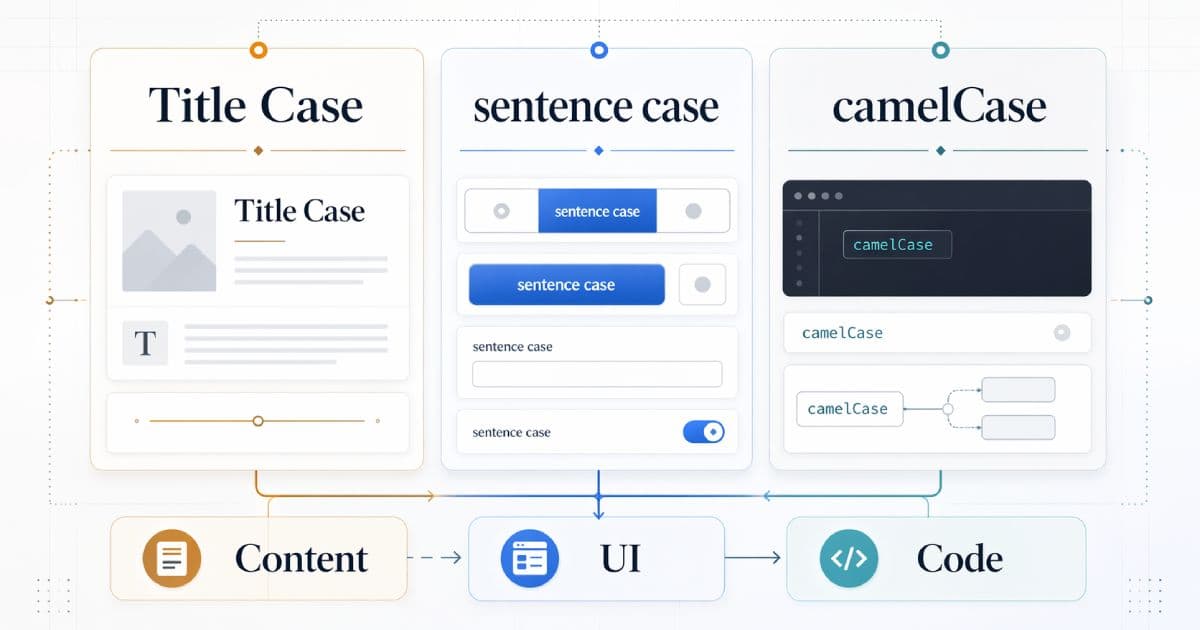
This guide separates the four decisions teams conflate: sentence case, title case, technical casing (camelCase, PascalCase, snake_case, kebab-case), and ALL CAPS. Each has legitimate uses. None of them is universally correct.
TL;DR
- Sentence caseis the safest default for most UI text in modern design systems — buttons, labels, menu items, toasts, helper text.
- Title case still has valid uses in editorial content, SEO metadata, page titles, marketing hero headlines, and some platform-specific UI components.
- camelCase, PascalCase, snake_case, kebab-case belong to code, keys, and URLs — not to visible UI labels.
- ALL CAPS should be used sparingly; overuse harms readability and creates accessibility friction.
- The right standard is the one your system defines explicitly and applies consistently across UI, content, code, and URLs.
Cleaning up inconsistent labels, migrated copy, or messy spreadsheet exports? Normalise the strings first, then enforce the standard across the UI. The CodeAva Text Case Converter & String Cleanup Tool converts between Title Case, Sentence case, camelCase, PascalCase, snake_case, kebab-case, and CONSTANT_CASE, and cleans duplicate lines, stray whitespace, blank lines, and pasted HTML — entirely locally in your browser, so pre-release copy never leaves your device.
The real issue: casing is a design-system decision
Capitalisation is not a grammar question. It is a systems question about how the product presents language across every surface: buttons, tables, forms, error messages, empty states, onboarding, documentation, marketing pages, email templates, push notifications, and API error strings that might be surfaced raw.
The sources of drift are predictable:
- CMS imports. Old article titles arrive in whatever case the original author typed.
- Product marketing copy. Landing pages use Title Case hero headlines; the product UI uses sentence case. Teams copy marketing strings into the product verbatim.
- Legacy admin panels. Internal tools built quickly often expose raw column names.
- Developer-generated strings.
enumvalues, API error keys, and internal identifiers surface unchanged in settings pages, diagnostics, and logs. - Localisation handoffs. Translators follow the case they see; inconsistent source strings produce inconsistent target languages.
None of these are intentional. All of them are cheaper to prevent with a standard than to fix after the fact.
What major design systems actually do
There is no single industry rule. Mature design systems converge on the same methodology— define explicit rules per context — but not on identical rules.
- Material Design (Google) prefers sentence case for most UI copy, including buttons, menu items, navigation labels, and dialog titles.
- Microsoft Fluent current writing guidance generally favours sentence case across UI text.
- Apple Human Interface Guidelines are more context-specific. Apple historically uses title case for many navigation-bar titles, menu titles, and certain controls, while using sentence case for longer body text and some UI elements. The takeaway is that Apple emphasises per-context rules, not a single global case.
What those systems share is not a single rule — it is discipline. Each of them explicitly states when to use which case, and the rule is applied uniformly within each surface. Copying any one of them verbatim is reasonable; copying none of them and shipping whatever arrives in the pull request is not.
Sentence case: the default for most interface copy
Sentence case capitalises only the first letter of the phrase and any proper nouns. For most product UI it reads conversationally, matches how users read prose, and keeps every word below the visual weight of the first. It is also easier to localise, because most languages do not follow English title-case conventions and will need a rule per locale anyway.
Sentence case is a strong default for:
- Buttons and primary actions
- Menu items and dropdown options
- Form labels and placeholder text
- Helper text and inline validation messages
- Toasts, snackbars, and notifications
- Dialog titles and confirmation copy
- Settings rows, switches, and checkboxes
- Table column headers
- Empty-state and onboarding copy
Examples that typically work:
Create new projectExport reportBilling settingsInvite team memberYour changes were savedUnable to connect to GitHub
Note the last example: brand and product names (GitHub, iOS, macOS) keep their native casing regardless of the surrounding sentence case rule. That exception is part of the rule, not a departure from it.
Title case: where it is still appropriate
Title case remains the right choice for content that behaves like an editorial title rather than an action or label. It signals “this is a headline” and aligns with how readers encounter titles in magazines, books, and editorial metadata systems.
Legitimate uses of title case:
- Blog and article H1s
- HTML
<title>tags - SEO title tags
- Open Graph and Twitter/X card titles
- Marketing landing-page hero headlines
- Report, document, and export titles
- Brand and product names
- Some platform-specific UI components where the platform’s own guidelines prescribe it (e.g. certain iOS navigation bars)
Two practical rules:
- Title case in editorial layers does not have to match the UI case. A product with sentence-case UI copy can and usually should still publish blog posts with title-case headings.
- Pick one title-case convention (AP or Chicago are the most common in English) and commit to it. Mixing them produces the same perception of drift as mixing title case with sentence case.
On how editorial titles show up in search specifically, Why Google Rewrites Your Title Tags and Meta Descriptions covers why the title you set is not always the title Google displays — which is relevant when you choose the editorial-case convention for your <title> tags.
camelCase, PascalCase, snake_case, kebab-case: keep them in the technical layer
Technical casing formats exist because machines and programmers need consistent identifier shapes. They are not a style choice for user-facing copy; they are a language- and ecosystem-level convention.
- camelCase— JavaScript variables and functions, JSON keys, React props, TypeScript interfaces’ fields.
- PascalCase— class names, React component names, enum type names, TypeScript interfaces.
- snake_case— Python variables, some backend frameworks, many data-export formats (CSV column headers from analytics tools), database column names.
- kebab-case— URL slugs, CSS class names (in many conventions), HTML attributes, command-line flags.
- CONSTANT_CASE / SCREAMING_SNAKE_CASE — environment variables, top-level constants in many languages, enum values in some backends.
The single most common product-quality smell on this list is technical casing leaking into the UI:
/* UI label   */  API key
/* JSON key   */  "apiKey": "sk_live_..."
/* URL slug   */  /settings/api-key
/* CSV header */  api_key
/* Env var    */  API_KEY
The same concept wears a different shape at every layer. The user-facing layer should never show any of the others. If a dashboard renders apiKey or api_keyas a column header, the fix is not to “improve the string” — it is to introduce a presentation mapping so the UI reads API key regardless of what the backend key is called.
For the specific case of URL slugs, the choice of hyphens over underscores and lowercase over anything else is covered in detail in Hyphens vs. Underscores in URLs. For generating clean slugs from mixed-case source strings, the CodeAva Slug Generator & URL Sanitizer handles the kebab-case conversion plus the transliteration and separator normalisation that slug generation actually requires.
Accessibility: where casing choices create friction
Casing is not a major accessibility axis compared to contrast, focus order, or semantics — but the extreme cases do matter.
ALL CAPS reduces readability for many users
Long runs of all-caps text remove the letter-shape cues that sighted readers rely on when scanning. Research consistently shows reduced reading speed and comprehension for all-caps body copy, and users with dyslexia, low vision, or cognitive load constraints are affected disproportionately. ALL CAPS also reads culturally as shouting in most digital contexts, which changes the tone of the UI whether the team intended that or not.
Keep all-caps to short, styled labels where the visual-weight effect is the point (for example, a small tag like BETA or NEW), not to running UI copy, error messages, or paragraph text.
Screen readers and text-to-speech
Screen-reader behaviour around casing varies by engine, voice, and user settings. Two patterns come up most often:
- Some engines read short all-caps strings character-by-character (“B-E-T-A”) when they treat the string as an initialism, while reading longer all-caps text as regular words.
- Raw camelCase or snake_case surfaced directly in UI text (
customerID,invoice_status) may be handled inconsistently — some engines split on case transitions or underscores, some do not.
The safe position is not “camelCase is unreadable” — it is do not rely on a screen reader to repair strings that were never meant for users in the first place. Fix the source: keep technical casing out of visible UI copy, and prefer human-readable labels with normal sentence case.
The code-to-UI boundary: where teams get this wrong
The most common casing bug in real products is not the choice between sentence case and title case — it is the absence of a clean boundary between internal identifiers and presentation strings. When those layers blur, raw keys surface in dashboards, settings pages, logs, and migration tools.
A healthy mapping keeps each layer in its natural case and introduces an explicit presentation step. The same concept across four layers:
// Internal key (code / JSON)
const field = "customerId";

// Presentation string (UI label)
<label>Customer ID</label>

// URL slug (routing)
/customers/customer-id

// Data export (CSV / analytics)
customer_id
Mechanisms that enforce this boundary:
- Translation / i18n tables.Every user-facing string flows through a key → label map. The key stays in whatever format code prefers; the label is hand-written in the system’s chosen case.
- Form schemas with explicit
labelfields. Never let the form library derive a visible label from a key name. - Admin-panel configuration. Generated admin UIs (e.g. auto-CRUD) should accept explicit column labels in addition to the database column name.
- Error-message normalisation. Backend error codes (
INVALID_FIELD,NotAuthorized) map to sentence-case user-facing messages before they reach the UI.
The boundary work is unglamorous. It also pays back every time a new feature ships without a fresh round of raw-identifier bug reports.
Dirty text cleanup: case problems rarely arrive alone
Migrated strings almost never come in clean. A typical batch pasted from Slack, a PDF, a spreadsheet, or an old CMS export brings more than inconsistent casing:
- Smart quotes (
“”‘’) where the code expects straight quotes. - Non-breaking spaces (
U+00A0) that look like regular spaces but behave differently in comparisons and layouts. - Zero-width characters (
U+200B,U+FEFF) that render invisibly but break search, deduplication, and matching. - Stray line breaks inside what should be single-line labels.
- HTML tags or entities from rich-text editors.
- Leading or trailing whitespace that survives every downstream join.
Case normalisation is a single step inside a broader cleanup workflow. Two CodeAva tools cover the common cases:
- The Text Case Converter & String Cleanup Tool handles every case conversion plus trimming whitespace, collapsing spaces, removing blank lines, removing duplicate lines, and stripping HTML tags. Processing happens entirely in the browser, so pre-release copy stays on your machine.
- The Invisible Character Detector & Unicode Normalizer finds zero-width and other hidden characters and normalises Unicode forms — the exact class of problem that case conversion alone does not fix.
For large migrations, chain them: detect and remove invisible or non-normalised characters first, then run case conversion and whitespace cleanup, then import the result.
The decision matrix: when each format is actually correct
Paste this into your design-system documentation as a starting point. Tune the “Typical choice” column to match your product’s specific conventions.
| Surface | Typical choice | Why |
|---|---|---|
| Buttons, links, labels | Sentence case | Reads as an action; localises cleanly. |
| Dialog titles and form section headings | Sentence case (most systems) | Consistent with surrounding UI copy. |
| Navigation bar labels | Sentence case by default; title case if the system explicitly prescribes it | Platform-specific rules may apply (for example certain iOS contexts). |
| Article and blog H1s | Title Case | Editorial convention; matches reader expectations. |
HTML <title> and SEO titles | Title Case | Editorial context; matches search-result conventions. |
| Marketing hero headlines | Title Case (usually) | Reads as a statement or promise, not an action. |
| Code identifiers (variables, functions) | camelCase (JS/TS); snake_case (Python/Ruby) | Language ecosystem convention. |
| Component and class names | PascalCase | Standard for React, Vue, and most OO languages. |
| JSON / API field names | camelCase or snake_case (pick one per API) | Consistency across the API matters more than the choice. |
| URL slugs and paths | kebab-case, lowercase | Web convention; case-insensitive in many contexts but mixed case causes bugs. |
| Environment variables and constants | CONSTANT_CASE | POSIX and most-language convention. |
| Brand and product names | As the owner specifies (GitHub, iPhone, LaTeX) | Always overrides the surrounding case rule. |
Casing formats at a glance
| Format | Best use | Avoid using it for | Main risk if misused |
|---|---|---|---|
| Sentence case | Buttons, labels, menus, dialogs, most UI copy. | Editorial titles, SEO <title> tags, marketing hero headlines. | Can look under-weighted when used for content that needs editorial gravity. |
| Title Case | Article H1s, page titles, SEO titles, marketing hero headlines, document titles. | Buttons, labels, running UI copy. | Feels formal and shouty in product UI; hard to localise. |
| camelCase | JavaScript/TypeScript variables, JSON keys, React props. | Visible UI labels, URL slugs, document copy. | Exposes internal identifiers; can read as technical noise. |
| PascalCase | Class names, React components, enum types. | UI labels, URL slugs, environment variables. | Confused with brand capitalisation; leaks in dashboards. |
| snake_case | Python variables, database columns, CSV export headers, some backend APIs. | UI labels, URLs. | Reads as raw data when surfaced in product UI. |
| kebab-case | URL slugs, CSS class names (in many conventions), HTML attributes, CLI flags. | Code identifiers, JSON keys, document copy. | Not valid as a JavaScript identifier; breaks if used in code contexts. |
| ALL CAPS | Short styled tags (BETA, NEW), constants in code (CONSTANT_CASE). | Running UI copy, error messages, paragraphs. | Harder to scan; reads as shouting; handled inconsistently by some screen readers. |
Common mistakes teams make
- Mixing Sentence case and Title Case in the same UI surface. One dialog with a title-case heading next to a sentence-case button is the most visible form of casing drift.
- Exposing
camelCaseorsnake_casedirectly in dashboards, logs, or migration tools. If users seecustomerID, the bug is missing presentation mapping, not bad grammar. - Using ALL CAPS for emphasis across normal interface text. Styled tags are fine; all-caps warnings and CTA buttons are where readability falls off.
- Treating SEO title casing and UI casing as the same rule. Sentence-case UI and title-case page titles are compatible choices in the same product.
- Forgetting to define exceptions for brand and product names. GitHub, iOS, macOS, and LaTeX always override the surrounding rule.
- Bulk-importing dirty strings without normalisation. Migrated copy brings smart quotes, zero-width characters, and inconsistent case together; importing it as-is spreads the damage.
- Relying on CSS
text-transformto “fix” casing in the UI. The source string still carries the wrong case, which leaks into exports, screen-reader output, copy-paste, and analytics.
Team standardisation checklist
- Pick a default case for UI copy. Sentence case is the safe modern default; whatever you choose, write it down.
- Define when title case is allowed. Typically: article H1s, page titles, SEO titles, marketing hero headlines. Be explicit so no one guesses.
- Keep technical casing out of visible labels. Map internal keys to human-readable strings at the presentation layer.
- Define exceptions for brands, acronyms, and product names. List them in the design-system docs so writers and translators use the right casing.
- Normalise imported or migrated strings. Case-convert and remove invisible characters before the strings reach the UI, not after.
- Add linting or content QA where possible. Even a simple regex check for ALL-CAPS button labels catches the majority of real drift.
- Document the rules in the design system. Every rule that is not written down is an argument waiting to happen.
- Re-check key surfaces for consistency after every major release. Navigation, settings, onboarding, and error messages are the usual drift hotspots.
The real casing mistake is not the style choice
Normalise before you enforce
Enforcement starts with clean inputs. Before linting rules or content reviews can maintain a standard, the backlog of existing strings usually needs a one-time cleanup — and every new batch of imported or pasted copy needs the same treatment.
What the CodeAva Text Case Converter & String Cleanup Tool actually does:
- Converts between UPPERCASE, lowercase, Title Case, Sentence case, camelCase, PascalCase, snake_case, kebab-case, CONSTANT_CASE, inverted case, and alternating case.
- Removes duplicate lines (exact-match), trims whitespace, collapses internal spaces, removes blank lines, and strips HTML tags from pasted content.
- Processes everything locally in your browser— pre-release copy, customer exports, and migration samples never leave your device.
What it does not do: it is not a style-guide compliance engine (AP, Chicago, and APA have edge-case rules the tool does not enforce), and it is not a governance platform for tracking design-system adherence. For invisible-character problems, zero-width characters, and Unicode normalisation, pair it with the Invisible Character Detector & Unicode Normalizer. For URL slugs, the Slug Generator & URL Sanitizer handles the kebab-case conversion with the transliteration and separator rules slugs need.
Consistency is the feature
Casing is a scalability and consistency problem, not a grammar nitpick. The best teams treat it as part of the design system: sentence case as the safe default for most UI surfaces, title case retained for editorial contexts and specific metadata, technical casing kept on the technical side of the presentation boundary, and ALL CAPS reserved for short styled labels where the weight is intentional.
Document the rule. Keep technical identifiers out of visible labels. Normalise imported copy before it ships. The goal is not to win an argument about which case is objectively correct — it is to ship an interface where the user never has to notice the question.
When you are ready to normalise existing strings, run them through the CodeAva Text Case Converter & String Cleanup Tool, and for URL-side decisions see Hyphens vs. Underscores in URLs. For adjacent content-design territory — why Google sometimes overrides the case and wording in your <title> tags — see Why Google Rewrites Your Title Tags and Meta Descriptions.