
A user taps a button in the checkout. In the 80 milliseconds between intent and click, the header re-measures, a promo banner slides in, and the button moves down by 48 pixels. The tap lands on a delete icon instead. The page never crashed, nothing was slow in isolation, and the code review flagged nothing unusual. But the conversion is gone.
Cumulative Layout Shift is the Core Web Vital that surfaces this exact class of problem. It does not measure how fast the page loads. It measures how stable what the user is looking at actually is — during load, and, just as importantly, after it.
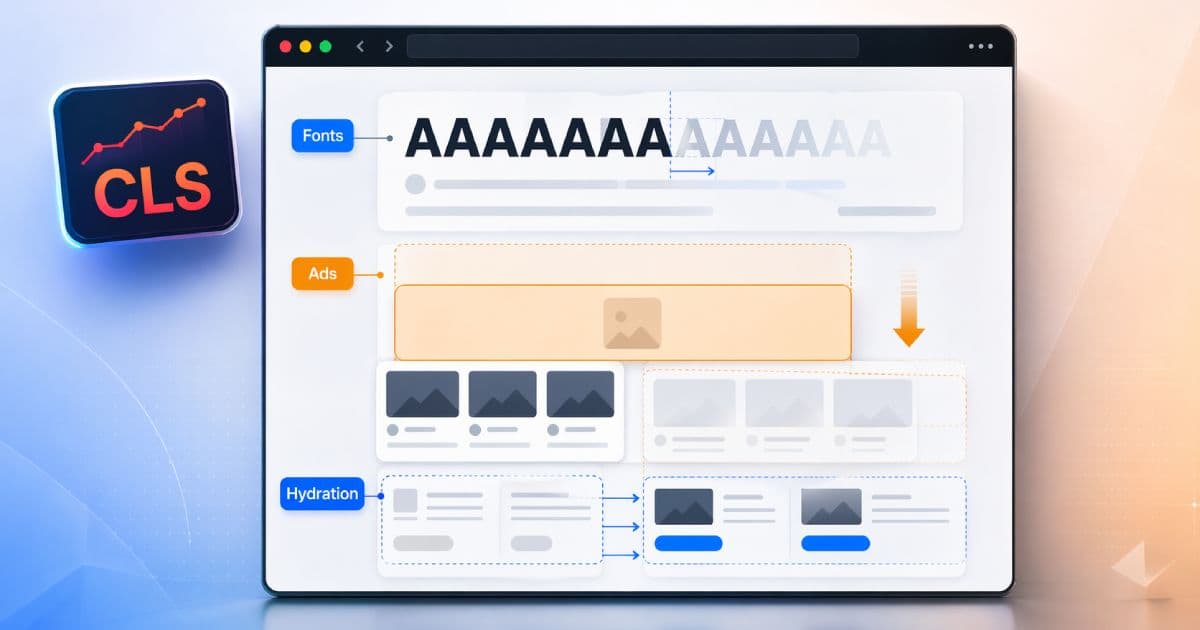
On modern frontends, three causes dominate: web fonts that reflow text, ads and embeds injected into unreserved space, and hydration or post-render UI changes that move content the user has already started reading. This guide is a debugging playbook for each of them.
TL;DR
- CLS is about unexpected layout movement, not generic slowness.
- Web fonts shift text when fallback and final font metrics do not match, even with
font-display: swap. - Ads, iframes, and embeds cause CLS when space is not reserved in advance.
- Hydration and post-render UI changes can move already-visible content even when the SSR output looked stable.
- Field CLS and lab CLS often disagree — real users see post-load shifts that local reloads rarely reproduce.
- The fix is almost always to reserve space, align font metrics, and avoid layout-impacting changes after paint.
Start with a quick external snapshot of the page’s technical hygiene using the CodeAva Website Audit, then use the workflow below to find exactly which regions are moving and why. The audit does not measure CLS directly, but it will flag the metadata, header, and crawl-signal issues that frequently accompany a poorly-instrumented performance story.
What CLS actually measures
CLS measures unexpected layout shifts on a page. A layout shift happens when a visible element changes its starting position between two rendered frames. The score is the product of how much of the viewport moved (the impact fraction) and how far it moved (the distance fraction) for each shift, aggregated across the largest burst of consecutive shifts in a session window.
Google’s published thresholds at the 75th percentile of page views:
- Good: 0.1 or less
- Needs improvement: more than 0.1 and up to 0.25
- Poor: greater than 0.25
Not every layout change counts. Shifts that begin within 500ms of a user interaction are flagged with hadRecentInputand excluded — opening an accordion or expanding a menu is not a CLS problem. Shifts outside that grace window still count, including those that happen long after initial load if the layout moves unexpectedly.
If you want the foundational framing before continuing, the Core Web Vitals overview covers how LCP, INP, and CLS fit together and how Google uses them in field measurement.
Why field CLS and lab CLS often disagree
A page can look perfectly stable in a local Lighthouse run and still fail CLS in Search Console. That disconnect is one of the most common sources of frustration for performance teams.
Lab tools capture a narrow window of the page lifecycle — typically cold load on a fixed device profile, on a warm machine, with synthetic throttling. Real users load the page in very different conditions:
- Slower networks and devices that delay font, ad, and script resources long enough for them to shift the layout visibly after the user has started reading.
- Cold and partial caches that change the order in which resources arrive, sometimes for the first time.
- Delayed ad fills that pop in hundreds or thousands of milliseconds after the page appears stable.
- Post-load interactionssuch as scrolling, opening a panel that depends on async data, or personalized UI that only mounts after a user event — any of which can trigger unexpected shifts.
Field CLS from CrUX or your own RUM always includes these post-load shifts. Lab CLS usually does not. Treat lab runs as a diagnostic aid, not the source of truth, and verify every fix against field data.
Culprit 1: web fonts
Web fonts are one of the most overlooked CLS causes on modern sites. The problem is not that fonts are slow — it is that fallback fonts and final fonts almost always have different metrics. When the browser swaps the fallback for the final font, the width of words, the line-height of paragraphs, and the height of containers change in the same frame. Everything below the text block moves.
font-display: swap keeps text visible during loading, which is good for LCP. But on its own it does not prevent the layout shift caused by the swap itself. The reliable fix is to make the fallback font render at the same size as the final font so the swap is visually imperceptible and layout-neutral.
Modern font-face metric overrides — size-adjust, ascent-override, descent-override, and line-gap-override— let you tune a local fallback to match the metrics of your final font:
/* Final web font */
@font-face {
  font-family: "AppSans";
  src: url("/fonts/AppSans.woff2") format("woff2");
  font-display: swap;
  font-weight: 400;
  font-style: normal;
}

/* Tuned local fallback with matching metrics.
   Values are generated per-font using tools such as
   Fontaine, Next.js next/font, or capsize. */
@font-face {
  font-family: "AppSans Fallback";
  src: local("Arial");
  size-adjust: 100.06%;
  ascent-override: 92.49%;
  descent-override: 24.06%;
  line-gap-override: 0%;
}

:root {
  font-family: "AppSans", "AppSans Fallback", system-ui, sans-serif;
}
With the fallback and final font sized identically, the swap stops producing a visible shift even on slow connections. A few additional guardrails:
- Preload the critical fontused by above-the-fold text, but only one or two weights — not every variant.
- Subset fonts to the scripts and weights you actually use. A smaller font file arrives sooner and gives the swap less time to cause pain.
- Avoid shipping multiple display fonts above the fold when one will do.
- Check the heading font, not just body text. Large headings reflow more visibly than paragraphs.
Culprit 2: ads, embeds, and iframes
Ads, social embeds, recommendation widgets, and cookie banners behave the same way: they arrive asynchronously and take a size that is not known at server-render time. If the surrounding layout does not reserve space in advance, content below them is pushed down the moment they appear.
The fix is to commit to a size before the third-party content arrives, and to keep that commitment even if nothing ever loads.
<!-- Reserved ad container — stable at every render phase -->
<div
  class="ad-slot"
  style="aspect-ratio: 300 / 250; width: 300px; max-width: 100%;"
  role="complementary"
  aria-label="Advertisement"
>
  <!-- Skeleton visible until the ad script replaces it -->
  <div class="ad-placeholder" aria-hidden="true"></div>
</div>

<style>
  .ad-slot {
    /* aspect-ratio reserves height before any child exists */
    background: var(--muted);
    overflow: hidden;
  }
  .ad-placeholder {
    width: 100%;
    height: 100%;
  }
</style>
Practical rules for any async-injected UI:
- Reserve space with fixed dimensions,
aspect-ratio, ormin-heightequal to the largest likely creative for that slot. - Render a placeholder or skeleton immediately so the space is visually committed, not just mathematically reserved.
- Never collapse an empty slot after a failed load. An empty reserved box is visually inert; a collapsing container shifts everything below it.
- Pin cookie notices and consent UI to a corner or the viewport edge rather than inserting them above existing content.
- Beware responsive ad sizes.If a slot can serve 300×250 or 300×600, reserve the taller size or constrain the ad unit to a single height.
Culprit 3: hydration and post-render UI changes
The trickiest CLS bugs happen after the page looks finished. The SSR output is stable. First paint is clean. Then the client hydrates, and something moves.
Common patterns that trigger post-render shifts:
- Auth-dependent headers that render as a generic nav on the server and expand into user menus, avatar bubbles, or trial countdowns after hydration.
- Cookie banners and consent UIs injected above existing content by a late-loading consent manager.
- Personalization blocks that swap placeholder content for user-specific content at a different height.
- Carousels, tabs, and accordions that render in a collapsed or default state on the server and expand on mount based on stored preferences or URL state.
- Client-only measurement logic— ResizeObserver callbacks, container queries polyfills, or JavaScript that sets explicit dimensions after reading layout.
The goal is not to avoid hydration. Hydration is normal and necessary. The goal is to make the hydrated DOM match the server DOM in shape and size, and to reserve space for any UI that can only appear after hydration.
Practical guidance:
- Render a consistent initial layout on both server and client. If the header has two possible states (signed-in and signed-out), render a version whose height does not depend on which one wins.
- Reserve space for client-only components that mount after hydration — banners, announcements, chat widgets — using the same
min-heightoraspect-ratiopatterns used for ads. - Avoid inserting content above existing content after paint. If a banner must appear late, overlay it or place it below the fold.
- Keep SSR and client branches in sync. Hydration mismatches that force React to re-render large subtrees are a well-known source of post-load shifts.
Before-fix vs after-fix examples
Fonts
Before: The fallback system font has a larger x-height than the final web font. When the web font finishes loading, every paragraph becomes one line shorter, and the hero image jumps up by 24 pixels.
After: A tuned fallback @font-face with size-adjustand ascent/descent overrides matches the final font’s metrics. The swap happens but produces no visible movement.
Ads and hydration
Before (ad): An ad slot is rendered as an empty <div>. The ad script sets the container height only after the creative arrives. Article content below the slot jumps down by 250 pixels a full second after first paint.
After (ad): The container uses aspect-ratio: 300 / 250 on a placeholder immediately. Whether or not the ad ever loads, the space remains the same and nothing below it moves.
Before (hydration): A generic nav renders on the server. After hydration, the client detects an active trial and renders a 48-pixel trial-countdown banner above the nav, pushing the entire page down.
After (hydration): The nav reserves a 48-pixel strip on the server by default; if the trial banner does not apply, the strip holds a neutral placeholder. The hydrated state fills the same space without changing the document height.
The debugging workflow: find the shifting region first
Effective CLS work starts with identifying what moved, not with guessing at causes. Work through these steps in order:
- Reproduce on a representative profile. Throttle to a slower network and CPU tier in DevTools when the issue only appears for real users.
- Enable Layout Shift Regions in the DevTools Rendering panel so shifts are highlighted in real time on the page.
- Record a Performance tracefrom a cold reload through the first 10–15 seconds of the page lifecycle, including any scroll or interaction you want to audit.
- Open the Experience track in the trace and inspect each layout-shift entry. Expand the entry to see the affected nodes.
- Identify what moved— which element, which container, which region of the viewport.
- Identify what caused it to move by correlating the shift timestamp with the Network track (font arrival, ad response, consent script) and the Main track (hydration, state updates, ResizeObserver callbacks).
- Map the cause to a culprit class: fonts, ads/embeds, hydration, or another unreserved-space issue.
- Apply the fix: metric override, reserved container, stable SSR/client layout.
- Re-test locally on the same throttled profile to confirm the shift is gone.
- Confirm field improvementin Search Console or your RUM over the following weeks — CrUX reports on a 28-day rolling window, so results take time to surface.
How to debug CLS in Chrome DevTools
DevTools has three complementary surfaces for layout-shift debugging. Use all three rather than relying on a single score.
Layout Shift Regions
Open DevTools, press Cmd/Ctrl + Shift + P, and run Show Rendering. In the Rendering panel, enable Layout Shift Regions. Reload the page. Every shift is briefly highlighted in blue as it happens, so you can see exactly which region of the page is unstable without reading any timeline.
Performance trace and the Experience track
In the Performance panel, record a cold reload. When the trace finishes, look for the Experience track near the top of the flame chart. Each red bar is a layout shift. Click one to see:
- The affected nodes and their previous and current rects.
- The shift value and whether it had
hadRecentInputset. - The timestamp, which you can cross-reference with Network.
Correlate the shift with the Networktrack to see which resource completed just before the shift — usually a font, ad, or third-party script — and with the Main track to see which JavaScript task ran at the same moment.
Performance Insights
The Performance Insights panel groups layout shifts into a dedicated insight with a direct link to the element and a plain-language summary of the likely cause. It is the fastest way to get an initial read on a page you have not debugged before.
Common mistakes teams make
- Relying on
font-display: swapalone and ignoring the metric mismatch between fallback and final fonts. - Loading ads or embeds into unreserved containers and assuming the layout will “settle” quickly.
- Inserting consent or promo banners above existing content after paint, rather than overlaying or anchoring them.
- Changing header or nav height after hydration to reflect auth state, trials, or feature flags.
- Blaming images only while ignoring fonts and post-hydration widgets that often contribute more to the final score.
- Testing only on a fast local machine with a warm cache, where delayed resources resolve before they can produce a visible shift.
- Treating CLS as a one-time fix. New ad formats, new banners, or new personalization flows can reintroduce shifts long after the page was stabilized.
CLS cause cheat sheet
A quick reference for mapping a visible shift to its likely origin and fix:
| CLS cause | What usually goes wrong | What to inspect | Typical fix |
|---|---|---|---|
| Web fonts | Fallback and final font metrics differ; text reflows on swap. | Shift timestamp vs. font response in Network; text blocks in Layout Shift Regions. | Tuned @font-face fallback with size-adjust and ascent/descent overrides. |
| Ads and embeds | Container has no committed height before the ad arrives. | Ad slot element in the shift entry; response time in Network. | Fixed dimensions, aspect-ratio, or min-height with a visible placeholder. |
| Hydration / client-only state | Server and client output render at different heights. | Shift timestamp vs. hydration task in Main; React warnings in console. | Stable SSR layout; reserve space for client-only UI. |
| Cookie or promo banners | Banner injected above existing content after paint. | Consent or promo script in Network at shift time. | Overlay or bottom-anchor the banner; never push content down. |
| Late third-party widgets | Chat, recommendations, or social embeds arrive without a reserved slot. | Widget container in the shift entry; script source in Network. | Fixed-size container or off-canvas mount; skeleton while pending. |
Stability checks before release
Visual stability is primarily a DevTools and field-data problem, but a pre-release technical hygiene pass still catches many of the metadata and delivery issues that accompany unstable pages — missing canonical tags, missing security headers, stale Open Graph images, and broken crawl signals.
The CodeAva Website Audit is a fast technical-signal check for a public URL: HTTP and HTTPS status, on-page metadata, Open Graph and Twitter Card tags, crawl signals, and common security headers. It is useful as a quick pre-launch review alongside manual CLS debugging, but it does not measure Core Web Vitals. For CLS specifically, Chrome DevTools, Lighthouse, and field data from Search Console or RUM remain the right tools.
The most dangerous CLS misconception
width and height on <img> tags is a good default, but on modern sites the shifts that actually push pages into the poor range almost always come from fonts, injected third-party content, or post-hydration layout changes. Fix those first, and CLS usually falls below the threshold on its own.Stability is an engineering quality issue, not polish
Visual stability is not cosmetic. It changes whether users click the thing they intended to click, whether they trust the interface they are using, and whether the conversion they started actually completes. The biggest CLS wins almost always come from the same three places: reserving space, stabilizing font swaps, and eliminating layout-impacting changes after the page is already visible.
Start every CLS investigation with the same question: what moved, and when?The answer tells you whether you are looking at a font, an ad, a hydration change, or something else — and once you know what moved, the fix is almost always a single committed size, a single metric override, or a single stable render path away.
When you are ready to pressure-test a specific page, start with a quick CodeAva Website Audit for baseline technical hygiene. For the rendering side of performance, the LCP Debugging Checklist for Modern Frontends walks through the load phases that most often share a root cause with CLS regressions, and Finding Real INP Bottlenecks in Production covers the main-thread work that frequently drives the hydration-era shifts this guide describes.